
Download Chrome crx creator – create chrome themes, custom chrome themes, chrome theme tool, theme creator for chrome, chrome customizer, create chrome extensions, chrome theme designer, chrome theme maker, chrome theme packer
Overview
Chrome crx creator is a specialized utility designed for Windows users seeking to personalize their Google Chrome browser experience without requiring technical expertise. The application enables users to create custom themes for Chrome through a visual, intuitive interface, making browser customization accessible to individuals across all skill levels. Its primary purpose is to simplify the process of designing and packaging themes, eliminating the need for coding or complex file manipulation. This tool addresses the common challenge of limited theme options in the official Chrome Web Store by empowering users to craft unique, personalized interfaces tailored to their preferences.
Target users include casual web users, digital creatives, educators, and students who wish to enhance their browsing environment with custom aesthetics. The app is particularly valuable for those who value individuality in their digital workspace but lack the technical background to develop themes from scratch. While the developer, Chrome crx creator, has not provided additional details about its origin or development history, the application has been available since 2009, indicating a long-standing presence in the niche productivity space.
Real-world use cases include personalizing work or study environments to improve focus, creating branded themes for educational institutions or small businesses, or simply expressing creativity through digital design. In the broader app ecosystem, Chrome crx creator fills a specific gap by offering a lightweight, dedicated tool for theme creation—complementing the larger Chrome extension ecosystem without overlapping with general-purpose design software.
Key Features & Functionality
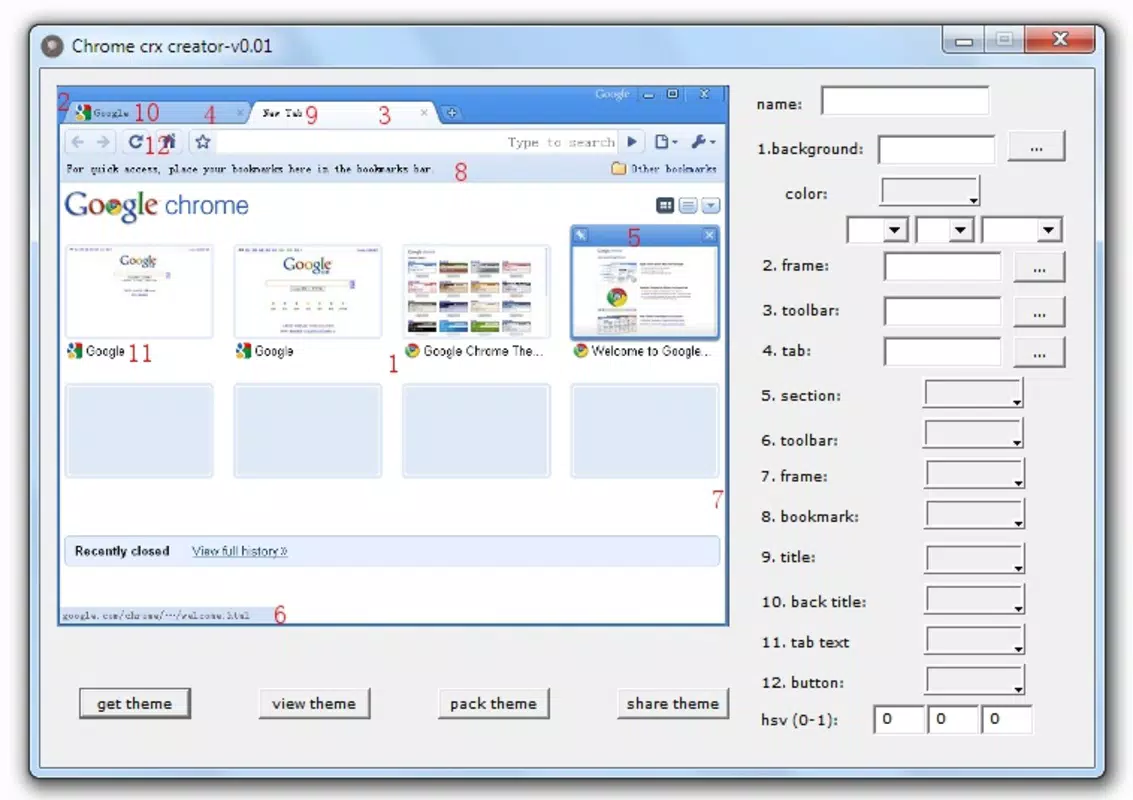
- User-Friendly Interface: The application features a graphical layout that visually represents the Chrome browser interface, allowing users to identify and modify specific elements such as the toolbar, tab bar, and background with ease. This visual mapping reduces the learning curve and supports intuitive navigation, even for first-time users.
- Customizable Elements: Each component of the Chrome interface is labeled with a numerical identifier, enabling precise control over colors, gradients, and image uploads. Users can adjust individual elements independently, ensuring a high degree of customization while maintaining design coherence.
- Easy Theme Packaging: With a single click on the 'pack theme' button, the application generates a complete theme folder containing all necessary files. This streamlines the export process, making it simple to install the theme directly into Chrome without manual file handling.
- Preview and Share Themes: Before finalizing, users can preview their theme within the application to assess visual impact and usability. The tool also includes a sharing function that allows users to upload their creations to a built-in gallery, fostering community interaction and theme discovery.
- No Programming Skills Required: The application is designed to be accessible to non-technical users. It abstracts the underlying file structure and coding requirements of Chrome themes, allowing anyone to create and deploy custom designs without prior knowledge of HTML, CSS, or JavaScript.
For example, a student might use Chrome crx creator to design a calming blue-themed interface to reduce visual fatigue during long study sessions. A teacher could create a themed browser for classroom use, incorporating school colors and logos. The tool’s simplicity ensures that users can experiment freely and iterate quickly, turning creative ideas into functional browser designs in minutes.
Interface, UX & Performance
The user interface of Chrome crx creator is built around a clean, minimalistic design that emphasizes clarity and function. The main window displays a visual mockup of the Chrome browser, with clearly labeled interface elements that users can modify. Navigation is straightforward, relying on a linear workflow: select an element, adjust its properties, preview the result, and export the theme.
Visual style is consistent with early 2000s Windows utility applications—functional rather than modern. While the design may appear dated by current standards, it remains highly effective for its intended purpose. The layout prioritizes usability over aesthetics, ensuring that users can focus on customization without distraction.
Performance is optimized for low-resource environments. With a file size of just 1.5 MB, the application loads quickly and operates smoothly on older or entry-level Windows systems. Although the developer did not list formal performance metrics, the lightweight nature of the app suggests stable operation across a wide range of devices. Responsiveness is maintained during theme editing, with minimal lag when adjusting colors or uploading images.
Stability appears to be consistent, given the app’s long availability since 2009. However, no information was provided about crash rates, update frequency, or compatibility with modern Windows versions beyond the basic platform specification.
Platform Compatibility & Technical Requirements
Chrome crx creator is designed exclusively for the Windows platform. It is compatible with Windows operating systems, though specific version requirements were not listed by the developer. The application has a file size of 1.5 MB, making it suitable for installation on devices with limited storage capacity.
Given its release date of 2009, the app was likely built for older Windows versions such as Windows XP or Windows 7. However, the developer did not specify minimum OS requirements or compatibility details for modern Windows 10 or Windows 11 environments. Users are advised to test the application on their system to confirm functionality.
Since no information was provided about hardware requirements, permissions, or background processes, it is assumed the app operates with minimal system impact. The lack of detailed technical disclosures means users should exercise caution when installing software from less-known sources.
Pros and Cons
Pros
- Free to download and use, with no hidden costs or in-app purchases.
- Intuitive visual interface that simplifies theme creation for non-technical users.
- Enables complete customization of Chrome interface elements without coding.
- Lightweight design with minimal system resource usage.
- Supports easy theme packaging and previewing before deployment.
Cons
- Platform limited to Windows; no support for macOS or Linux.
- Developer did not provide information about compatibility with modern Windows versions.
- Outdated interface design may not appeal to users accustomed to modern UI standards.
- No official update history or support channel available.
- File size and age suggest potential security risks if not downloaded from trusted sources.
FAQ
Is Chrome crx creator safe to download?
The application is free and available for download, but users should ensure they obtain it from a reputable source to avoid potential security risks, especially given its age and lack of official updates.
Can I use Chrome crx creator on Windows 10 or Windows 11?
While the app was released in 2009, there is no official confirmation of compatibility with Windows 10 or 11. Users are encouraged to test the application on their system to verify functionality.
Do I need programming knowledge to use this tool?
No. Chrome crx creator is designed specifically to allow users to create custom Chrome themes without any programming skills or technical background.
Can I share my custom themes with others?
Yes. The application includes a built-in feature to preview and share created themes through its gallery, enabling users to distribute their designs to the community.
What is the file size of Chrome crx creator?
The application has a file size of 1.5 MB, making it suitable for devices with limited storage and slow internet connections.
Final Thoughts
Chrome crx creator remains a niche but functional tool for users who wish to personalize their Google Chrome browser without technical barriers. Despite its age and outdated interface, its core functionality—creating and packaging custom themes—remains relevant. The application excels in simplicity, accessibility, and efficiency, making it ideal for students, educators, and casual users who value a customized browsing experience.
While modern alternatives may offer more advanced features and better compatibility, Chrome crx creator stands out for its minimal footprint and zero learning curve. For those seeking a straightforward way to design and deploy custom themes on Windows, this tool delivers consistent value.
Download Chrome crx creator now


